AMT Help Files

Base Setup
The Base Setup tab lets the system administrator control the system-wide base setup. Values can be entered by selecting the Change hyperlink. The first two values should match the values in the Sys.ini file in the AMT-COBOL system root directory. The System logpath can be any directory with write permission.
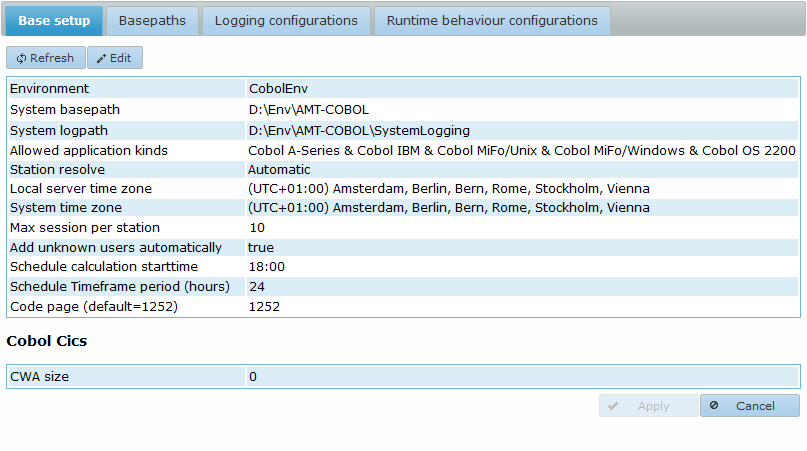
Field description:
- Environment: The name of this AMT environment. The name can be chosen freely.
- System basepath: The system basepath as set in the Sys.ini file for this environment.
- System logpath: The path to the system logging directory. Although it is free to choose, it is recommended to use a folder in the root directory of the environment.
- Allowed application kinds: This sets the application kinds allowed in this environment. The displayed options depend on the application kinds in the AmtRuntime license. Enabling all available options is common practice for most environments.
- Azure: This option is visible only when you have an AMT Azure license. Set it to true when AMT is installed in a Microsoft Azure environment.
- Station resolve: Determines how a new station receives its name by selecting one of the following options:
- Automatic: The station name is chosen automatically depending on the web browser used.
- User: The station name is the same as the user name.
- Predefined: The station name is set manually by the system administrator in the Security → Users menu of the Control Center. In this menu, select a user, click the Edit button, and enter the predefined station name in the Station field.
- IP Address: The IP address of the station is used as the station name.
- Terminal: The terminal ID of the user is used as the station name. info Note: terminal IDs are only used in COBOL OS2200 environments.
- Local server time zone: The local time zone of the server on which the Control Center is hosted.
- System Time Zone: A free-to-choose time zone to use for the AMT-COBOL environment. All times in the AMT Control Center are displayed in the local time of the user, converted to and from this time zone, and stored in the system database.
Changing the System Time Zone does not convert the time values of existing job schedules, queued jobs, job history, and so on. These values should be updated manually when the System Time Zone is changed. Therefore, it is not recommended to change the System Time Zone after the AMT environment has been used in production. - Max session per station: The maximum number of allowed sessions for each end-user station for the web client. Allowed values are from 1 to 10.
- Add unknown users automatically: If enabled, this automatically adds new users who access the Control Center but are not yet known to the environment to the system database.
- Schedule calculation starttime: The time at which the time frame used by the batch controllers for job scheduling begins. Each day at this time, a batch controller checks the job schedules for any job requests that should be created within the next hours specified in the Timeframe period. The default is 18:00 for new environments, and it should preferably be set at a time when the system has a low workload.
- Schedule Timeframe period (hours): The period to use for the batch controller schedule, in hours. The default is 24 for new environments.
- Code page (default=1252): Sets the character encoding. This is used to convert between Unicode and ASCII to display special characters correctly. Warning: Changing this setting could alter values of existing data in files. We therefore strongly advise against changing this setting.
- CWA size: The size of the common work area in bytes.