
Foreign Keys
A foreign key establishes a link between two tables, namely between a 'foreign key table' and a 'reference table'. When the data in the reference table is changed or deleted, specific actions can automatically be done to the linked data on the foreign key table.
The link is established between the keys of the primary index (or the built-in LIONRECNO index) on the 'reference table' and specific fields on the 'foreign key table'. A table can have multiple foreign keys defined, thereby linking it to multiple reference tables.
Creating a foreign key
To create a new foreign key, do the following:
- Open the table definition on which you want to define the foreign keys and select the "Foreign Keys" node.
- Ensure that the table is locked by selecting the lock button in the top toolbar.
- Select the option "Add new foreign key" from the right-hand pane. The following screen appears:
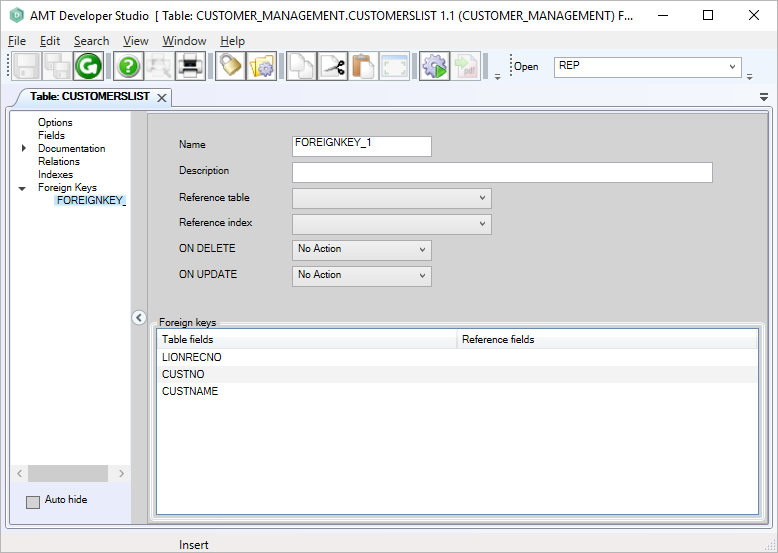
- To complete the specification, see "Adjusting a foreign key" below.
Adjusting a foreign key
- Select the foreign key you want to adjust from the "Foreign Keys" node.
- Ensure that the table is locked by selecting the lock button in the top toolbar.
- Set the properties for the foreign key as described below:
|
Option: |
Description: |
Value: |
|
Name |
Name of the foreign key. |
<Text> |
|
Description |
Description of the foreign key. |
<Text> |
|
Reference table |
The table to which the foreign key references. This table can be picked from the dropdown list, which contains all tables that are available in the application. |
<Table name> |
|
Reference index |
The index that is related the reference table. The dropdown list only contains indexes having unique keys. |
<Index name> |
|
ON DELETE |
The action to be performed on the foreign key table when the associated record is deleted from the reference table. |
<Cascade | No Action | Set null> |
|
ON UPDATE |
The action to be performed on the foreign key table when the associated record is updated on the reference table. |
<Cascade | No Action> |
|
Table fields |
The fields that are available in the current table. |
<Field name> |
|
Reference fields
|
Key fields in the Reference index. Select from a dropdown list the key field from the reference index to associate with the field on the current table. |
<Field name> |
- On completion, click the save button in the top toolbar of the Developer.
- The table must be checked in first before it can be called from other objects.
Deleting a foreign key
- Open the table definition on which you want to adjust the foreign keys and select the "Foreign Keys" node.
- Ensure that the table is locked by selecting the lock button in the top toolbar.
- Select the foreign key to delete and right-click on it, then select "Delete" from the pop-up menu (or press Delete on the keyboard).
- On completion, click the save button in the top toolbar of the Developer.
- The table must be checked in first before it can be called from other objects.
Generate the application and reorganize the database
After a foreign key is added, adjusted or deleted, a Whole System generate is required, followed by a database reorganize.