AMT Help Files

Start Job
The Start Job section in the Control Center enables the user to start jobs.
Filters are available to narrow down which jobs are shown in the list. It is possible to filter by Application, Jobtype, Queues, and by search string (case insensitive), which can be entered in the Jobname field to only display jobs with that name.
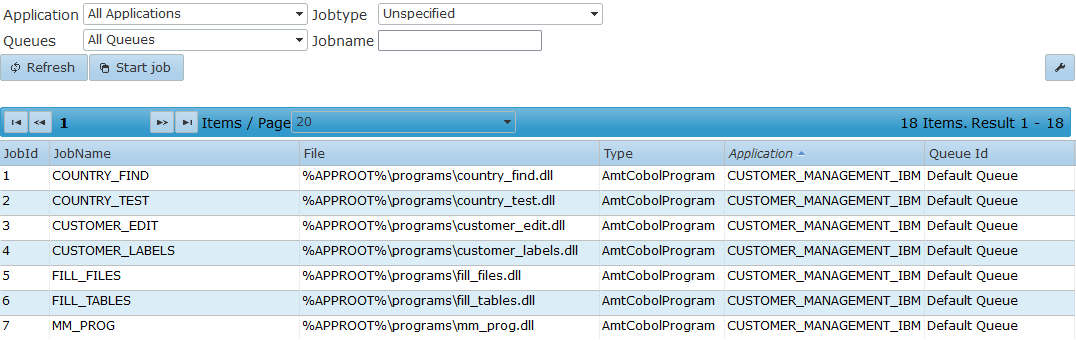
To start a job, select the job and then select the Start button.
- Different jobs are able to run simultaneously. For the same job to run simultaneously, the Simultaneous setting needs to be enabled in the Job Queue configuration (Simultaneous = true).
- Jobs are run in the same order as they are positioned in their queue.
If a job is unable to be processed, the jobs behind it in the same queue will be blocked from running and receive the Queued status, except in the following cases:- The Simultaneous setting of the queue is set to false—only the jobs with the same name will be blocked.
- The Start date/time of the job has not yet been reached—these jobs will not block other jobs.
The following window appears if a job of the type report was opened:
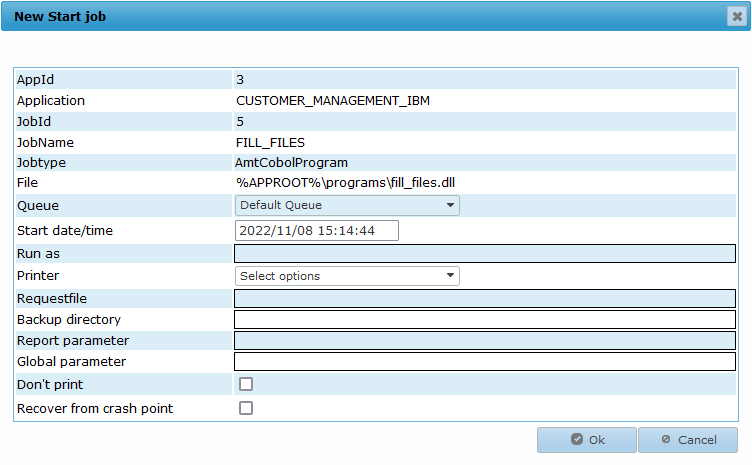
The following options are available for the Report job type:
- Queue: The queue in which the job will be placed. Also see the Job Queue Priority help page.
- Start date/time: The date and time on which the job will execute (this time is local to the user of the Control Center).
- Run as: Start the job as the specified user. The Batch Controller retrieves the specified user credentials from LoginAccounts to start the job. The job will fail to start if the account is not found or disabled.
- Printer: Select a printer to print with.
- Requestfile: If the job requires user input, this file can be used to enter inputs in advance.
- Backup directory: If set, print files will be saved in this directory.
- Report parameter: This option is not used in AMT-COBOL.
- Global parameter: This option is not used in AMT-COBOL.
- Don’t print: If enabled, only a print file is created. No paper print will be made.
- Recover from crash point: This option is not used in AMT-COBOL.
The following options are available for the Script, Batch, and Executable job types:
- Queue: The queue in which the job will be placed. Also see the Job Queue Priority help page.
- Start date/time: The date and time on which the job will execute (time is local to the user of the Control Center).
- Run as: Start the job as the specified user. The Batch Controller retrieves the specified user credentials from LoginAccounts to start the job. The job will fail to start if the account is not found or disabled.
- Commandline (script) parameter: (Optional) a parameter to send to the script. It can be read in the ComScript job interface parameter ScriptParameter.
- Restart At: (Optional) a parameter to send to the script which indicates from which point the script should be restarted. It can be read in the ComScript job interface parameter RestartAt. A custom restart mechanism must be added to the script to use this parameter.
Select the Ok button to place the job in the selected queue.