AMT Help Files

Parameters
The stored procedure parameters can be edited as follows:
- Select the "Parameters" node in the left-hand pane as follows:
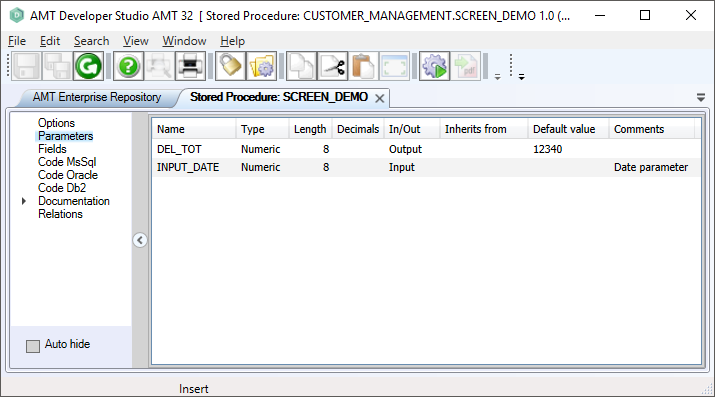
- Ensure that the stored procedure is locked by selecting the lock button in the toolbar.
- To insert a parameter: right-click in the right-hand pane and select "Insert".
- To delete a parameter: right-click on the parameter name and choose "Delete".
- Parameter properties are set via the object inspector. You can also set it via the bulk mode screen by right-clicking in the right-hand pane and choosing the option "Bulk Mode". The bulk mode screen lets you view and edit the parameters in a free-format text window. See Bulk Mode for more information.
- Parameters can be given a default value. These values are used when the stored procedure is called without parameters.
The following properties are set on the Parameter screen:
|
Property: |
Description: |
Value: |
|
Name |
Name of the parameter. | <Text> |
|
Type |
Parameter type. | <Alpha | Numeric | Financial | Float Double | Float Single | Signed | String | Integer | Boolean | DbsDate/Time> |
|
Length |
Maximum number of characters for the parameter, including any decimal positions. Not applicable for String, Integer or Boolean. |
<Integer> |
|
Decimals |
Number of decimals for the parameter, which is included in the Length. Not applicable for Alpha, String, Integer, DbsDate/Time or Boolean. |
<Integer>
|
|
Comment
|
Description of the parameter. | <Text> |
| Default value |
A default value to use when the stored procedure is called without the usage of parameters. |
A value of the type of the parameter. |
|
SpInOut
|
Specifies the type of parameter data : Input = data into the procedure Output = data out of the procedure Input/Output = input and output data Return = data out of the procedure, set to a value with the SQL 'RETURN' command |
<Input | Output | Input/Output | Return> |