
First Use of the Control Center
The Control Center can be started for the first time in an internet browser by navigating to the web application of the Control Center as configured in Adding the Necessary Websites to the IIS when all of the installation and configuration steps have been completed.
Using OpenID Connect Authentication
The Control Center will automatically add a user using the OpenID Connect identity user name. Automatically added users will only be placed in the User Role. In order to configure the AMT environment, it is necessary to temporarily translate an OpenID Connect Identity name to the built-in ADMIN account using the AMT Reorganization tool.
| No password will be set for users at first login. User accounts with a blank password are not allowed with Username/Password authentication. It is therefore important to set a password for the user account to be able to use cookie authentication (username/password) in AMT REST API web services. |
Restore admin
To translate an identity name to the ADMIN user, the AMT Reorganization tool must be started with the RESTOREADMIN parameter.
Open a console (Command prompt/Terminal) and navigate using the CD command to the following directory: <AMT_Environment>\AmtTools\Reorganize.
From there, start the AMT Reorganization tool using the syntax: AmtReorganize.exe /RESTOREADMIN=<OIDC identity>. Example: AmtReorganize.exe /RESTOREADMIN=John.Doe
Once the program starts the system database must be reorganized as explained on the Reorganizing the System Database page.
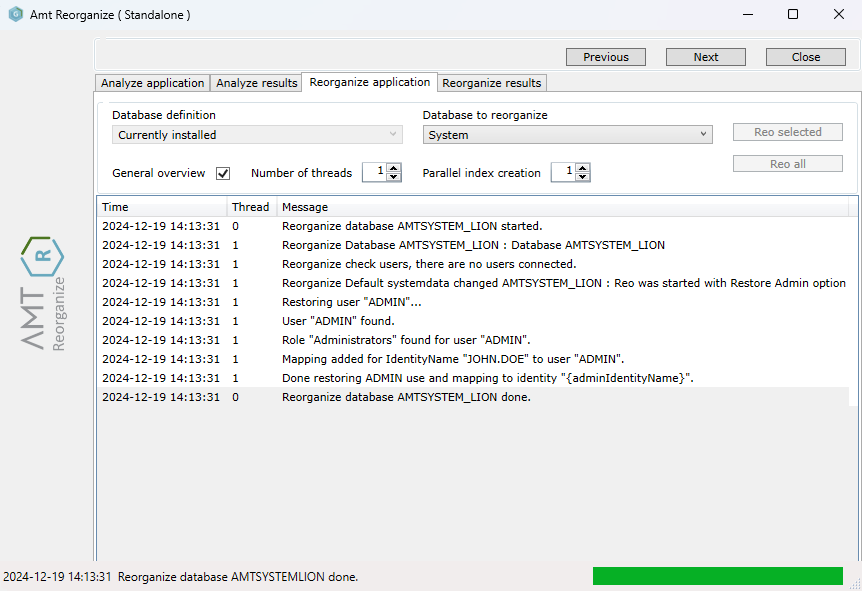
After reorganizing, the user will be identified as ADMIN user once logged into the Control Center.
Environment System Settings
When the Control Center is started for the first time in a new environment, it will detect that the System Database is completely empty and will start with the message "Empty environment" in the header.
- Navigate to the menu item System Configuration → System Setup to enter the Base Setup tab.
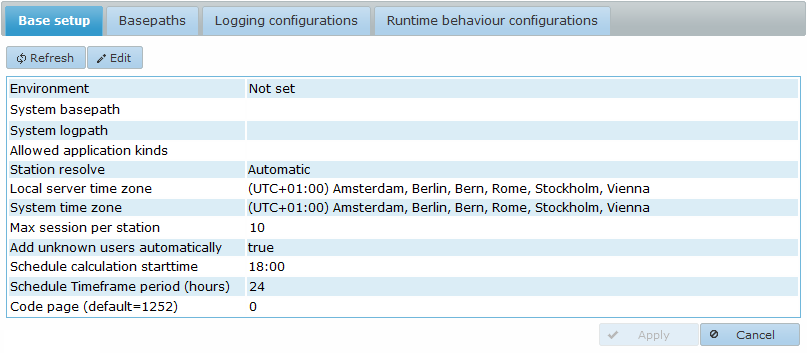
- Select the Edit button to begin configuring its settings.
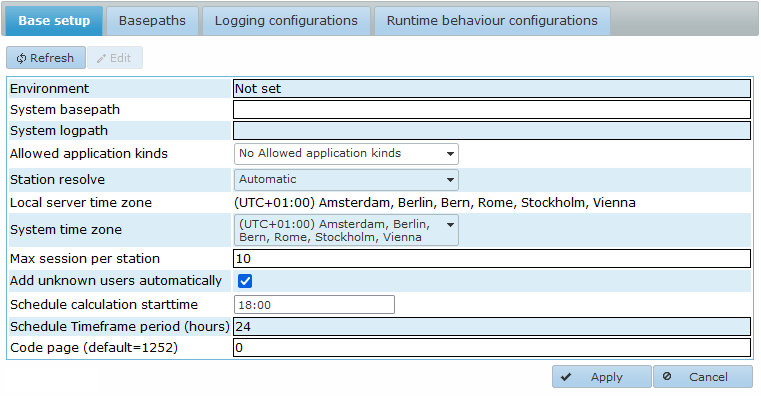
- Use the following list as a guide to configure each setting:
- Environment: A free to choose name for this environment.
- System basepath: The system basepath as set in the Sys.ini file for this Environment.
- System logpath: The path to the system logging directory. Although you may choose freely, it is advised to use a Systemlogging directory in the root directory of the Environment.
- Allowed application kinds: This sets the application kinds which are allowed in this Environment. The displayed options depend on the application kinds in the AmtRuntime license. Enabling all available options is common practice for most environments.
- Azure: This option is only visible if you have an AMT Azure License. Should be set to true if AMT is installed in a Microsoft Azure environment.
- Station resolve: Determines how a new station receives its name by selecting one of the following options:
- Automatic: The station name is chosen automatically depending on the web browser used.
- User: The station name is the same as the user name.
- Predefined: The station name is set manually by the system administrator in the Security → Users menu of the Control Center. In this menu, select a user, click the Edit button, and enter the predefined station name in the Station field.
- IP Address: The IP address of the station is used as the station name.
- Terminal: The terminal ID of the user is used as the station name. info Note: terminal IDs are only used in COBOL OS2200 environments.
- Local server time zone: The time zone of the server the Control Center runs on.
- System Time Zone: A free to choose time zone to use for the AMT environment.
- Max session per station: The maximum number of allowed sessions for each end user station for the web client, allowed values from 1 to 10.
- Add unknown users automatically: Automatically add new users to the system database when accessing the AMT environment.
- Schedule calculation starttime: The time of the start of the time frame the batch controllers use for job scheduling. Each day at this time a batch controller will look in the job schedules if any job requests should be created within the next hours mentioned in the Timeframe period. Defaults to 18:00 for new environments, preferably this should be set at a time when the system has a low workload.
- Schedule Timeframe period (hours): The period to use for the batchcontrollers schedule in hours. Defaults to 24 for new environments.
- Code page (default=1252): Sets the character encoding. This is used to convert between Unicode and ASCII to display special characters properly. Defaults to 1252, which equals to 0. Warning: Changing this setting could cause values of existing data in files to be altered. We therefore strongly advise to not change this setting.
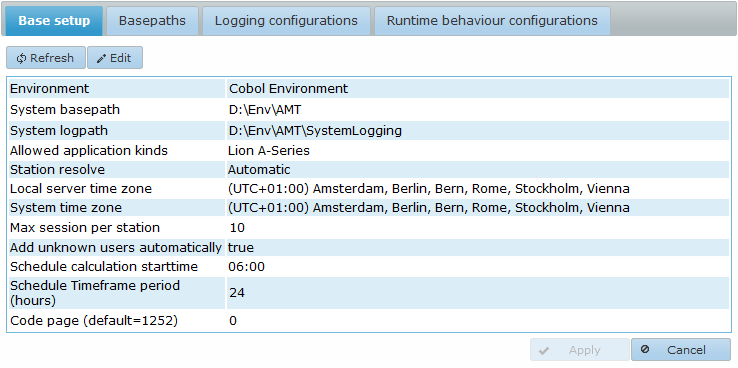
- Select Apply to save the configured settings. The Control Center will restart with the new environment settings.
| Account Identity Translation |
|---|
| After setting the environment's system settings, it is strongly advised to remove the identity translation to the ADMIN account as well as configuring the security settings for the default Users and Administrators roles. |
For further configuration of the Control Center and the Installation of Applications in the Environment see the AMT System Administration and Operation training guide for AMT.