AMT Help Files

ABORT
| Syntax Color Legend |
|---|
| Command |
| Mandatory parameter |
| Optional parameter |
| Mandatory keyword |
| Optional keyword |
Syntax
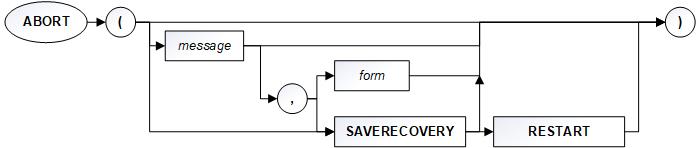
ABORT ([SAVERECOVERY [, RESTART ]| <Message> [,<Form> | SAVERECOVERY [, RESTART]]])
Description
Terminates all current transactions and rolls the database back to the state it was when the current form was initiated. If no form is supplied, the screen remains unchanged. If a form is supplied, execution restarts with that form. The updates of that form are performed, even though the calling form was rolled back. The message will be displayed on the status line.
Diagram
Returned value type
None
Parameters
| Parameter | Description |
|---|---|
| SAVERECOVERY | When this option is set and the command SAVERECOVERYNAME (SRN) has been used in the report, it is possible to restart the report manually, at the point where the abort occurred. To restart the report automatically, the RESTART keyword must also be set. |
| RESTART | When this keyword is used, the report restarts automatically at the last recovery point set before the abort occurred. Up to 5 restart attempts occur unless overridden by MaximumNumberOfRestarts. |
| <Message> | Expression giving the message to be displayed. |
| <Form> | The name of the form to be called. This option is valid only in the source code for forms. |
Remarks
If used in reports, the database is rolled back to the last COMMIT point and the report is terminated.
Example
q_aobs1.index (proaobs1)
q_aobs1.equal (q_aobs2.levcode, q_aobs2.bestbonnr)
q_aobs1.getfirst ()

if resok
  sa-impcode := q_aobs1.impcode
else
  sa-warnsysop := format (sn-uniquenr) &
                  ' is not a valid vorauniquenr: '
  abort (sa-warnsysop, si-currform)
  exit
endif