
Analyzing the Reorganization
You can analyze the reorganization of the database or databases when the Analyze application tab is selected. The buttons in the upper-right corner show Analyze selected and Analyze all. Analyze selected analyzes the currently selected database in the Database to reorganize list. Analyze all analyzes the reorganization of all databases in the AMT environment. The Skip warnings check box lets a user hide warning messages. This option is turned on by default.
Analyze application
When you click one of the Analyze buttons, the Analyze application tab shows the progress of the analysis process, as shown below.
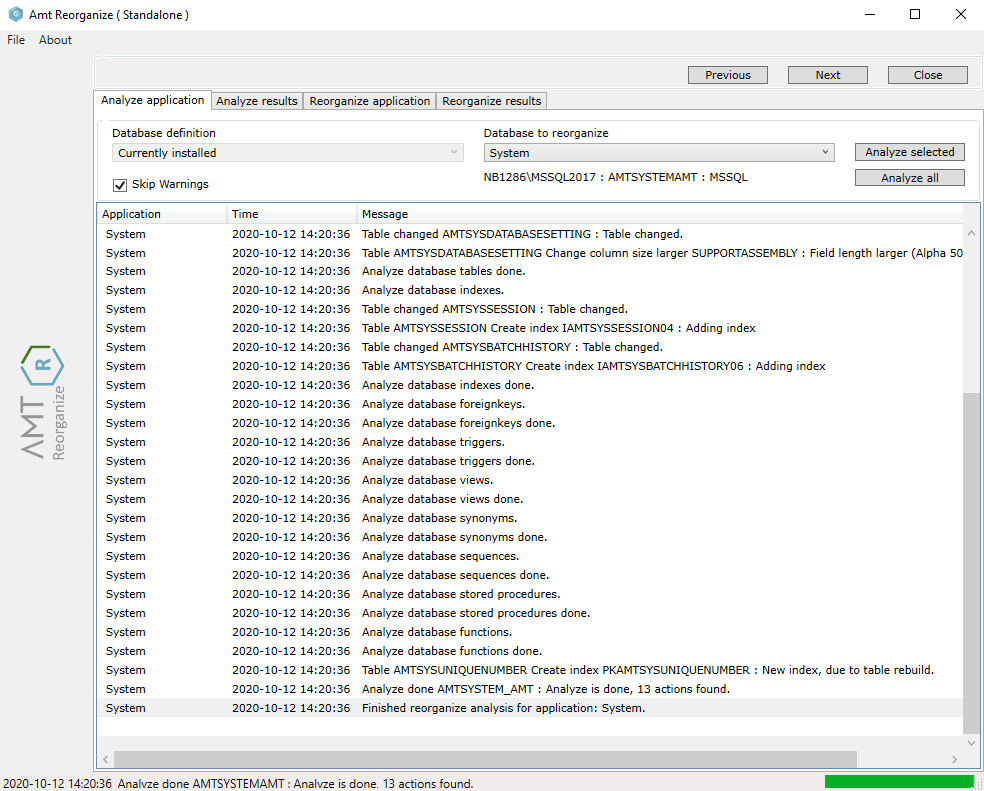
When the tool detects differences between the database definitions and the actual database, it displays them. At the end of the analysis process, it also shows the number of actions required for the reorganization.
Analyze results
When the analysis process is complete, the Analyze results tab shows a detailed list of the required actions. The columns display the database objects that require changes, the details of those changes, the reason for the change, and whether the action can be executed online (Online = True). The Collapse All and Expand All buttons can be used to close or open all nodes in the tree view.
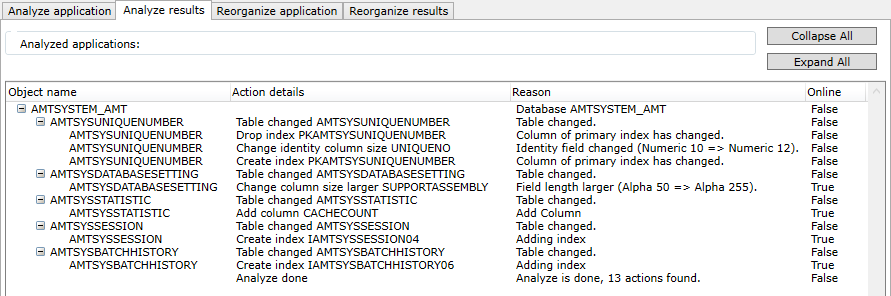
To execute the reorganization, first select the Reorganize progress tab to enable the reorganization buttons. See the Executing the Reorganization help page.