
Configuring PCI DSS encryption
To configure one or more applications to use PCI DSS encryption, follow the steps on this page.
Creating an encryption database
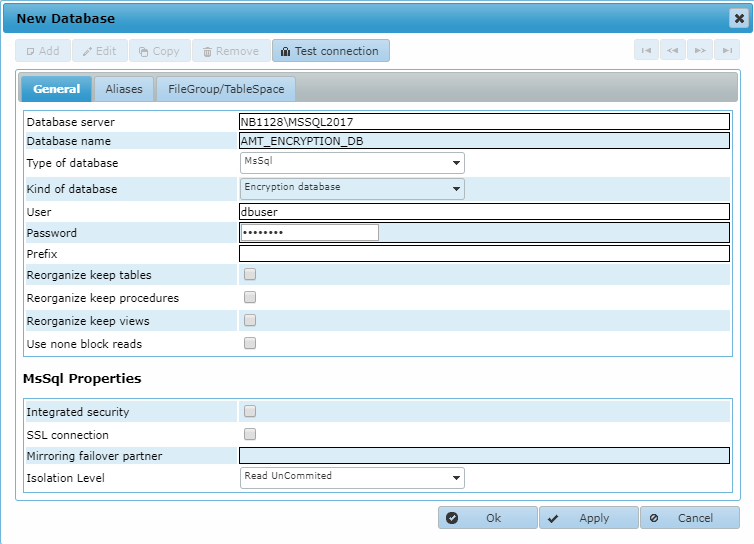
Before you can enable encryption, you must create an encryption database and add it to the database definitions in the Control Center. First, create an empty database on the database server. Then add it to the database definitions in the Control Center on the System Configuration > Architecture > Databases tab, with Kind of database set to Encryption database, as shown in the example below. Finally, perform an encryption reorganization on the encryption database with the Reorganization program.
Generating the necessary keys
Next, create at least two keys: one key for Encryption Key Management and one encryption key. How to do this is explained in the page Generating Keys for Encryption. Finally, the encryption keys must be activated. In the Control Center, go to Security Configuration > Encryption and activate edit mode by selecting Edit.
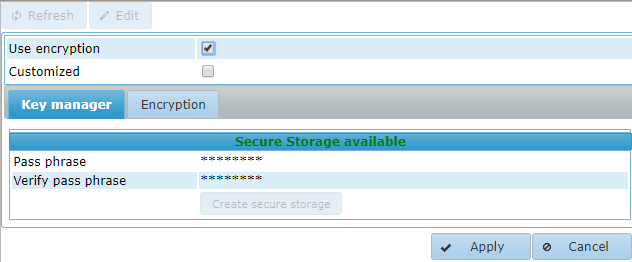
Select the Use encryption checkbox and then select Apply. AMT is now configured to use PCI DSS encryption.
Reorganizing the application database
Finally perform a Reorganization of the application database by using the AmtReorganize.exe program in the ...\AmtTools\Reorganization folder. Empty databases are reorganized immediately to use PCI DSS encryption for encrypted fields. In existing databases, unencrypted fields that are configured for encryption are converted to encrypted fields.