
Local Definitions
If items only need to be called from inside a single object, these items can be defined locally inside that object or inside an insertable that is called by that object. If items need to be called on other levels, these have to be defined globally (to make them available in the whole application) or inside the parameter list that is passed through a routine declaration (if items need to be passed through a routine call) instead.
Local definitions must always be placed in the beginning of the object code between the statements BEGIN_DEFINITIONS...END_DEFINITIONS. Keywords are used to separate the various types of declarations. The following types of local definitions can be specified:
- Constants, which are declared after the keyword "CONST". Fields that are defined as a constant have a fixed value, which must be specified through the declaration.
- Classes, which are declared after the keyword "TYPE". When using a Compare routine inside the class for sorting and comparing instances of that class in a list of classes, the keywords "Implements IComparer" must be added. Class fields can be defined below the Class definition after a access modifier keyword of either "PUBLIC" or "PRIVATE". Each class definition must be closed by a "END_CLASS" statement. See Type Class.
- Variables, which are declared after the keyword "VAR". Variables may be declared with an initial value, but this is not required. Through assignments that are written inside the object, the field values of variables can be set or changed at runtime. After a transmit, the values will be reinitialized.
- Retained variables, which are declared after the keyword "RETAINED_VAR". In comparison with normal variables, the values for retained values will be kept after a transmit. This means that if a value is assigned through the Process_main routine, this value still exists after running another form and then returning to the first form. The values will be maintained for each unique station and form. The maximum available space for storing the retained variable values for all separate transactions is limited to 8000 bytes. Retained variables may not be of the types "string" or "realstring"It is not possible to define any kind of query handlers as retained variables.
- Boolean functions, which are declared below the keyword "BOOLEANS". Fields that are defined as a boolean function will get the return value for the specified expression. The value changes at runtime whenever value(s) for the used constant(s) or variable(s) are (re)set.
- Shared layouts, which are specified below the keyword "SHARED_LAYOUTS". Layouts that are specified together as Shared layouts will use the same piece of memory. Just like for redefines, a change in one of these layouts will affect both.
If data items have the same type, you can define them as elements within an array. To make it possible to call multiple data items at once, these can be defined within a structure.
begin_definitions

  const

    // Constants

  type

    // Classes

  var

    // Variables

  retained_var

    // Retained variables

  booleans

    // Booleans

  shared_layouts

    // Shared Layouts

end_definitions
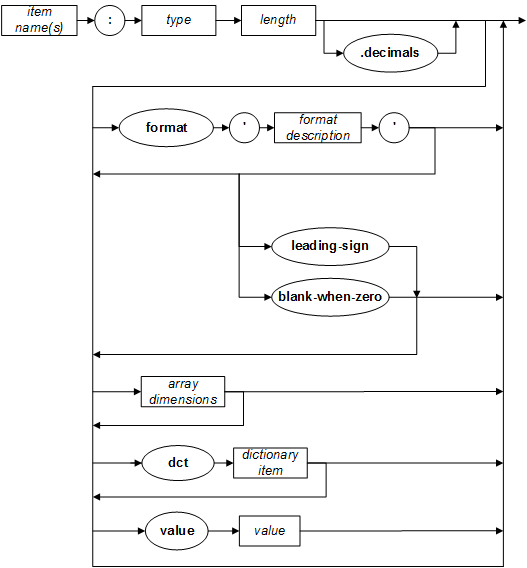
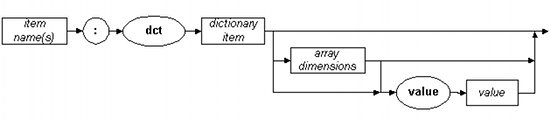
Depending on which value type is wanted, one of the following syntaxes is used:
<Item name(s)> : <Type> <Length>[.Decimals] [FORMAT '<Format description>' [LEADING-SIGN | BLANK-WHEN-ZERO] ] [<Array dimensions>] [DCT <Dictionary item>] [Value <Value>]
<Item name(s)> : [DCT <Dictionary item>] [<Array dimensions>] [Value <Value>]
If the type and/or length of a value and also the dictionary are specified, they must match.
<Target item> : <Type> REDEFINES <Source item>

| Parameter | Description | |
|---|---|---|
|
<Item names> |
Specification of the name for one or more constants or variables. When declaring multiple items at once, you have to use a comma (,) as a separator. This way, all specified items will instantly be defined with the same characteristics. |
|
|
<Type> |
Type of the specified constant(s) or variable(s), e.g. alpha, boolean, etc. See 'Value Types'. |
|
|
<Length> |
Maximum length of the specified constant(s) or variable(s). |
|
|
<Decimals> |
Decimal length of the constant(s) or variable(s). The decimal length is a part of the maximal length. |
|
|
<Array dimensions> |
Specification of the dimensions in the array. |
|
|
DCT |
Declaration to refer to a dictionary item. |
|
|
<Dictionary item> |
Name of a dictionary that applies to the variable(s). |
|
|
Value |
Declaration to assign (literal) values to the items. This specification always needs to be set for constants. |
|
|
<Value> |
Expression that returns the value to be stored within the item(s). |
|
|
<Target item> |
The name of the new item, that will use the same piece of memory as the <Source item>. |
|
|
REDEFINES |
Using the option REDEFINES, two or more items can use the same piece of memory. An update in one of these items will also automatically update the value in the other field(s). |
|
|
<Source item> |
Name of the item to be called under the name of the <Target item>. |
|
|
FORMAT |
This local definition option applies also to items that are defined in a structure or sub structure. If you use this option, and a variable is assigned to an alpha field, then the copied value in the alpha field will be formatted as is specified. See Format characters for a list of characters with special meaning inside format specifications. |
|
|
LEADING-SIGN |
Normally when using overpunch, the last digit (e.g. S6 in the example) would be decoded to a value like "12345G". With the LEADING-SIGN option, the sign will be coded in the FIRST digit, e.g. "B23456". |
|
|
BLANK-WHEN-ZERO |
With this option, the value "0" is stored as spaces, disregarding the specified FORMAT. |
|
Boolean function definitions must correspond with the following syntax:
<Variable>: <Boolean expression>| Parameter | Description | |
|---|---|---|
|
<Variable> |
Name of the boolean variable. |
|
|
<Boolean Expression> |
Expression that results in a boolean value. |
|
| Parameter | Description | |
|---|---|---|
|
<Layout names> |
Specification of the logical names of the file- or print layouts that must share the same piece of memory. In this specification, a comma (,) is used as the separator character. |
|
| Parameter | Description | |
|---|---|---|
|
<Handler> |
Name of the handler. |
|
|
<Handler type> |
Type of the specified handler. |
|
|
<Object> |
Object that is used through the handler. |
|