
Available Jobs
This tab shows the jobs available in the AMT-COBOL environment. Displayed are the Job name, the executable file of the job, the description of the job, the application the job belongs and the default Queue for this job.
Filters can be applied on the Application, the Queue and the Jobtype. Further in the Jobname field a search string (case insensitive) can be entered and only jobs with that string in the name will be shown.
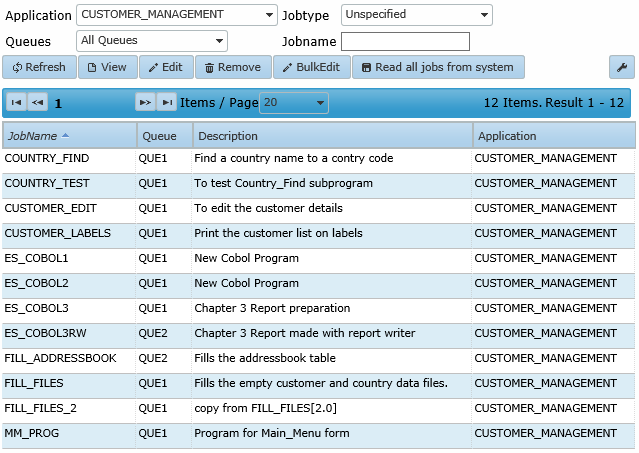
Clicking the 'Read all jobs from system' button will perform a reading of available batchjobs and reports and place them to the list. It is also possible to right-click an existing job and click Read all jobs from system.
Note: When read all jobs from system is executed the newly found jobs will be assigned to a job queue in the following order:
- When there is a queue assigned to the application this queue will be assigned to the jobs, regardless of an existing default queue.
- When there is no queue assigned to the application the default queue will get assigned to the jobs.
- When there is no queue assigned to the application and there is no default queue defined there will be no queue assigned to the jobs.
See also: Job Queue Priority.
| Unlike past behaviour, the 'Read all jobs from system' button will not remove jobs if the folder, as specified in the base paths, cannot be found. |
When an item of the list is selected the allowed actions are: View the details of a job, Edit a job, Remove a job or Read all jobs from system. When Read all jobs from system is chosen, all the batches, and reports in the selected applications are read and placed in the list.
If Edit job is chosen the following edit window will open:
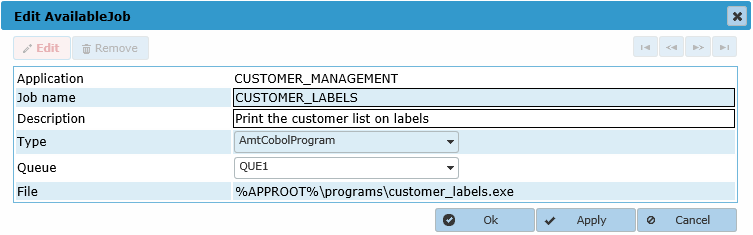
The following items can be changed :
- Job name: the job name shown in the list
- Description: a free to choose description text for this job
- Type: the type of the job
- Queue: the queue the job should be placed on by default
BulkEdit
With BulkEdit multiple jobs can be (re-)assigned to a jobqueue at once.When the BulkEdit button is clicked, a dropdown list with all available job queues appears as well as checkboxes to select the jobs.
After selecting the job queue and selecting the jobs, click the Apply button at the bottom right of the screen to change the job queue of the selected jobs.
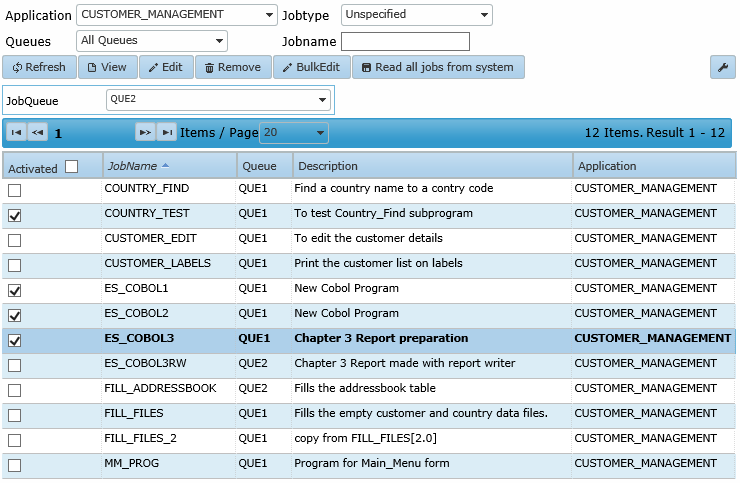
The checkbox next to the column name 'Activated' (de-)selects all jobs on the current page at once.