
BMS Terminal
The Basic Mapping Support (BMS) Terminal displays messages received from programs and transactions and enables direct navigation to transactions by entering a transaction code. Received messages are displayed in a text box of 23 lines with 80 characters on each line.
If a transaction code is entered in the text field, the application is redirected to that transaction. The text field is cleared after pressing Enter.
Flow of Requests at Runtime.
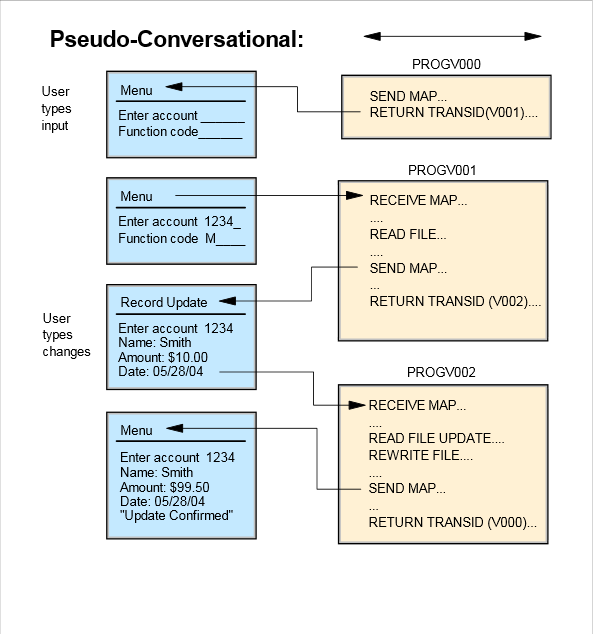
As in normal CICS COBOL, AMT Java uses the Pseudo-Conversational conversation model to send and receive information from the Form as shown in the following flow diagram.
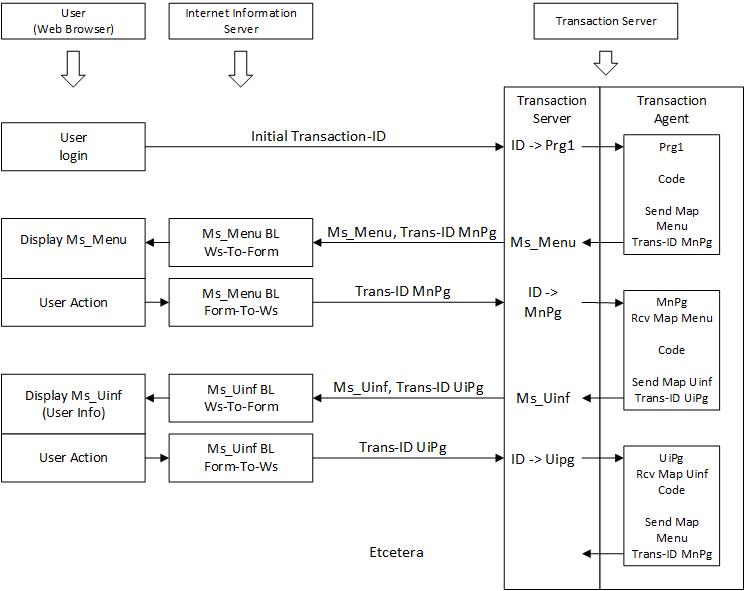
In AMT Java the information in the Symbolic Map buffer does not get automatically placed in the controls of the Form and vice versa. This task has to be performed by the web server when receiving a Symbolic map buffer and when sending user input back. Therefore each Form needs to contain a very small COBOL program that will perform this task.
The Procedure Division of this Program only needs to have two code sections named 'WS-TO-FORM' and 'FORM-TO-WS'. The first section (WS-TO-FORM) will be performed by the web server when output is sent to the form, the second section (FORM-TO-WS) is performed when user input is sent, as shown for both in the flow diagram below.
Field Naming & Mapping Rules
| Names for Controls and the Symbolic Map |
|---|
| As in CICS COBOL the name of the Controls must match the field names in the Symbolic Map excluding the last letter (i.e., L, F, A, etc.). |
Each input or output control on the Form must correspond to a field in the Symbolic Map. Attribute suffix letters
(e.g., -L, -F, -A) are omitted when naming the HTML control. For example, a
map field CUST-NAMEL becomes the control name/id CUST-NAME. Field names should remain
uppercase for consistency unless configuration explicitly enables case-insensitive resolution.
- Mismatches: A mismatch results in an empty value transfer or an exception depending on runtime configuration.
- Padding & Trimming: Alphanumeric fields are typically space-padded; trim trailing spaces on display and re-pad on submit.
- Encoding: If EBCDIC conversion applies, ensure translation occurs before DOM population.
Appearance
The appearance of the BMS Terminal can be customized using CSS. See the page CSS Styles for more information.