AMT Help Files

Window
Select Window to open the following menu:
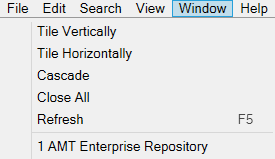
Tile Vertically
Places all open windows vertically next to one another. If four or more windows are open, windows tile both vertically and horizontally.
Tile Horizontally
Places all open windows horizontally next to one another. If four or more windows are open, windows tile both vertically and horizontally.
Cascade
Resets the size of all windows and stacks them on top of one another. The active window is always stacked on top.
Close All
Closes all windows.
Refresh
Refreshes the active window.
<# Name of window>
All open windows appear at the bottom of this menu. Select a window to make it active and bring it into focus.