
View
Select View to open the following menu:
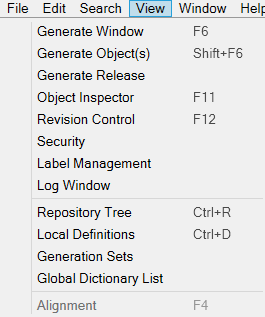
Generate Window
Opens the Generation window, from which you can generate objects.
Generate Object(s)
Opens a window with the following options to generate the selected object:
- Priority: Sets the priority for the generation of this object in the queue. The default setting is Normal.
- Private debug: If enabled, generates a debug version of the object, regardless of the general debug settings.
- Generate all children and parents (with their children) recursively: If enabled, generates all child and parent objects recursively in addition to the selected object.
Generate Release
Opens a window in which you can build a release from a generation set.
Object Inspector
Opens the Object Inspector for a selected item. For example, in a form layout,
this displays the selected item's Layout Properties.
Revision Control
Opens the Revision
Control window, where you can check in or delete objects.
Security
Opens the Authorization window,
from which you can view and manage user and group access privileges for the currently open application.
Label Management
Opens the Labels
window, which makes managing labels and identifying object revisions easier.
Log Window
Opens the Log Status window.
Repository Tree
Opens the Repository Tree window, the same window that opens when AMT Developer Studio starts.
Local Definitions
Opens the Definitions
node of an object, where the object's code is displayed.
Generation Sets
Opens the Generation
Sets window, in which you can create and manage generation sets.
Global Dictionary List
Opens the Global Dictionaries List window, displaying all available
dictionary objects within an application.
Alignment
While viewing the layout of an object such as a form, this opens a small window that
helps with aligning visual objects. While viewing
the definition of an object, selecting Alignment aligns the code.