AMT Help Files

Search
Select Search to open the following drop-down menu:
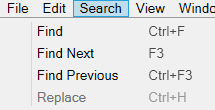
Find
Opens the Find window, in which you can perform a search.
Find Next
After performing a search, select Find Next to find the next instance of the search term.
Find Previous
After performing a search, select Find Previous to find the previous instance of the search term.
Replace
Performs a search and optionally replaces the result with the Replace with text. If text is already selected, this option pre-fills the Find text box.
| Warning |
|---|
| If an object is locked, you can't make changes to it using Replace. |