
Edit
Select Edit to open its drop-down menu:
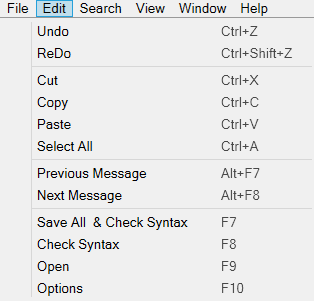
Undo
Undoes the last change, if available.
Warning: You can't undo changes after you save the object until you make new changes.
Redo
Redoes the last undone change.
Cut
Cuts selected text or items to the clipboard.
Copy
Copies selected text or items to the clipboard.
Paste
Pastes the most recently cut or copied content.
Select All
Selects all content in the active window.
Previous Message
Moves backward through the code and highlights where a warning or error occurred.
Next Message
Moves forward through the code and highlights where a warning or error occurred.
Save All & Check Syntax
Checks code for warnings and errors, then saves all changes.
Check Syntax
Checks code for warnings and errors.
Open
Enter commands to open or navigate windows (for example, "GEN" to open the Generation window).
See Open Commands for all available commands.
The drop-down arrow shows recently opened windows and objects.
Options
Opens the
Options window, where you can configure
Developer Studio settings.