AMT Help Files

Personal
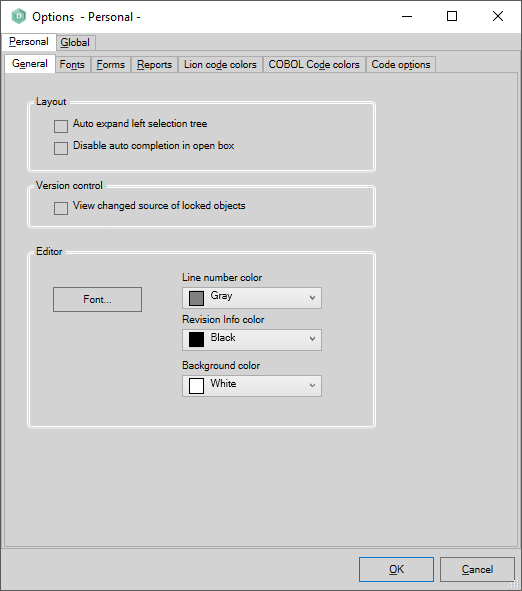
The Personal tab of the Developer Studio Options contains seven sub-tabs as shown below. After making changes to the options, click OK to save your changes.
General
- Auto expand left selection tree: If selected, automatically expands the tree on the left when you open an object for viewing or editing.
- Disable auto completion in open box: Disables auto-completion for commands in the Open command box.
- View changed source of locked objects: Shows changes in source code made by other users.
- Font: Opens a window to choose the font type used in the editor.
- Line number color: Sets the foreground color of line numbers in the editor.
- Revision info color: Sets the foreground color of revision info in the editor (if enabled from the right-click menu).
- Background color: Sets the background color of the editor.
Fonts
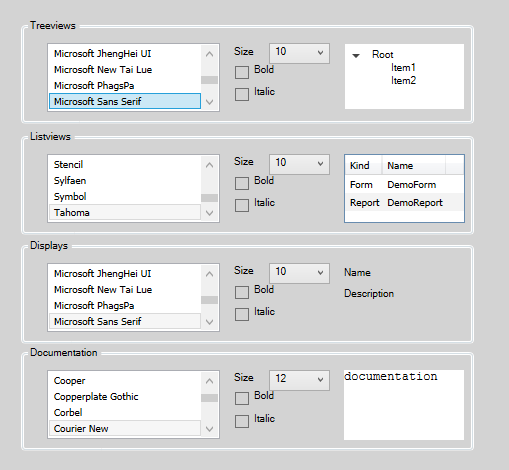
Set the fonts used for Treeviews, Listviews, Displays, and Documentation.
Forms
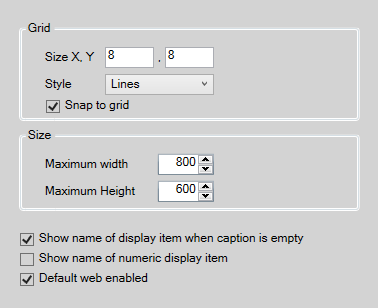
Configure options for the Graphical Layout editor of a form:
- Grid
- Size X, Y: Distance between grid lines in the X and Y direction (in pixels).
- Line style of the grid: Lines, Points, or None.
- Snap to grid: Snaps placed or moved objects to the grid.
- Size
- Maximum width: Maximum available width for placing graphical objects (in pixels).
- Maximum height: Maximum available height for placing graphical objects (in pixels).
- Show name of display item when caption is empty: Shows the display item name in screen layout when the object has no caption set.
- Show name of numeric display item: Shows the numeric display item name instead of its format.
- Default web enabled: Makes new forms web enabled by default.
Reports
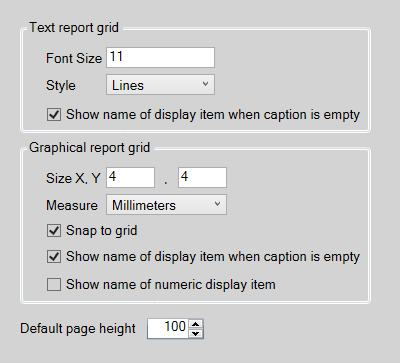
Configure options for the Print Layout of Text or Graphical Reports:
- Text report grid
- Font size: Size of the font used in print layout. Grid size is based on this font size (a larger font size enlarges the grid).
- Style: Line style of the grid: Lines, Points, or None.
- Show name of display item when caption is empty: Shows the display item name in screen layout when the object has no caption set.
- Graphical report grid
- Size X, Y: Distance between grid lines in the X and Y direction (in the unit defined in the Measure option).
- Measure: Unit of measure: Millimeters, Inches, or Points (Inch/72).
- Snap to grid: Snaps placed or moved objects to the grid.
- Show name of display item when caption is empty: Shows the display item name in print layout when the object has no caption set.
- Show name of numeric display item: Shows the numeric display item name instead of its format.
- Default page height: the default height of the graphical layout when created. Width will always be the page width.
Lion code colors
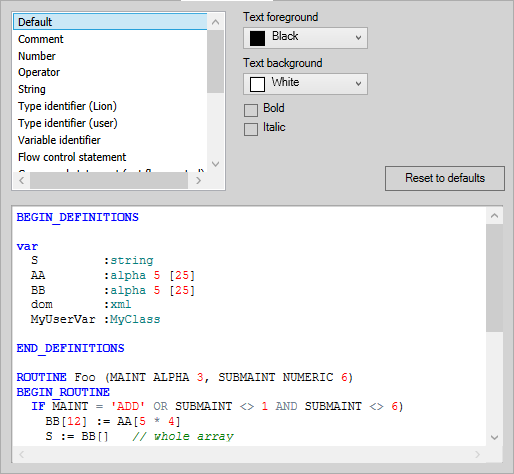
Set the colors and font properties used for different types of code when using AMT for Lion. For descriptions of the different display items, see Code colors.
Code options
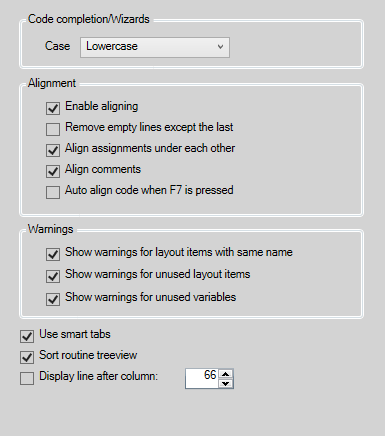
Configure the following code editor options:
- Code completion/Wizards
- Case: Whether to use Lowercase, Uppercase, or As defined/typed for code used by auto-completion of commands, the Wizards, and the creation of new objects. The As defined/typed option uses the same case style as the user has typed for self-defined items.
- Alignment: The alignment options to apply when pressing the Align Left button in the code editor, pressing F4, or pressing F7 when Auto align is enabled.
- Enable aligning: If selected, enables aligning. Clear this option to disable alignment, for example to avoid accidental aligning.
- Remove empty lines except the last: If selected and there are multiple consecutive empty lines in the code, these are reduced to a single empty line.
- Align assignments under each other: If selected, multiple consecutive assignments are aligned to the assignment operator.
- Align comments: If selected, comments are aligned to the rest of the code.
- Auto align code when F7 is pressed: If selected, the code is automatically aligned when the syntax is validated by pressing F7.
- Warnings
- Show warnings for layout items with the same name: If selected, warnings appear when there are multiple layout items with the same name.
- Show warnings for unused layout items: If selected, warnings appear for layout items not used in the code.
- Show warnings for unused variables: If selected, warnings appear for variables not used in the code.
- Use smart tabs: If selected, the code editor tabs to the first character after one or more spaces found in the line above, aligning the code with that line.
- Sort routine treeview: If selected, the routine treeview is sorted alphabetically instead of in the order the routines occur in the code.
- Display line after column: If selected, an additional vertical line is displayed in the editor after the column number entered.