
Completed Prints
The Completed Prints tab enables the end user to view the prints made by the application, to view the output of the print, and, if needed, reprint the output. When this function is selected, the following list is displayed.
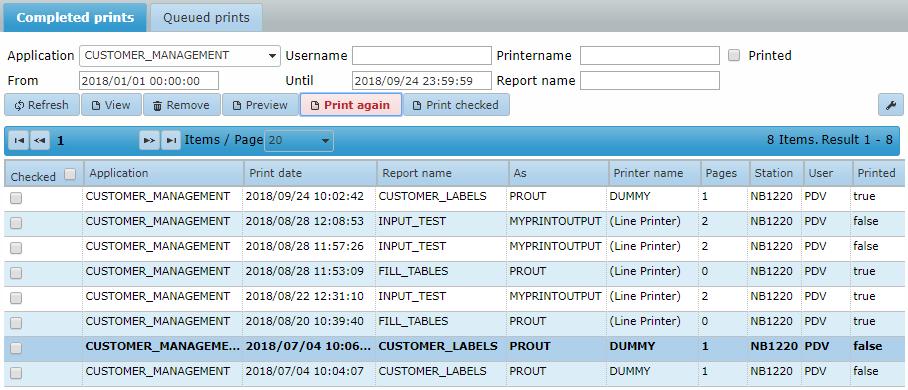
A filter can be applied on the application, a date and time window, the printed status, and the report name. When a report in the list is right-clicked, the user is presented with a choice to view the print output, to print the output again and to view the print details.
Preview
After selecting Print preview, the end user is presented with a preview of a PDF version of the print output in a separate browser window by using the Adobe Reader plugin. This enables the end user to view the print output, print it on a local printer or save it to a local machine.
Again
After selecting Print again, the end user will be presented with the following popup window.

The end user can choose the printer to send the print output to, whether to select a range of pages and the number of copies required. The printers available are defined in Control Center.
Checked
When selecting the Print checked button, the end user can (re)print multiple print jobs by checking the 'Checked' checkbox of the print job. A dialog to select the printer to print on will be presented to the end user.

Details
After selecting View, the end user will be presented with the following popup window displaying details about the print.
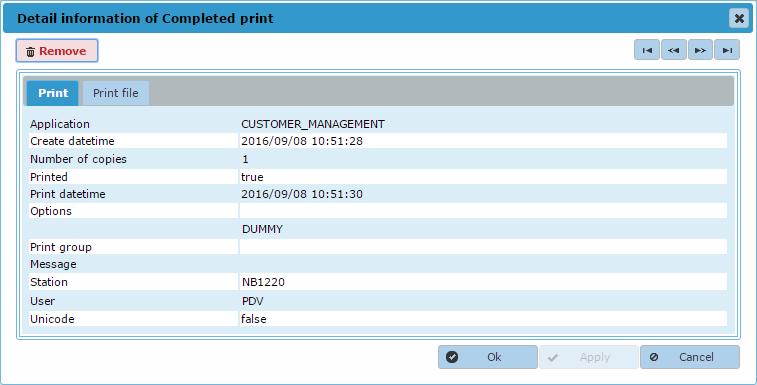
The information shown is self-explanatory and is not described further.
Remove
This removes (deletes) the print from the environment.