
OpenAPI JSON
In the OpenAPI JSON screen the OpenAPI JSON file belonging to the Web Service is shown for Consumable REST API web services.
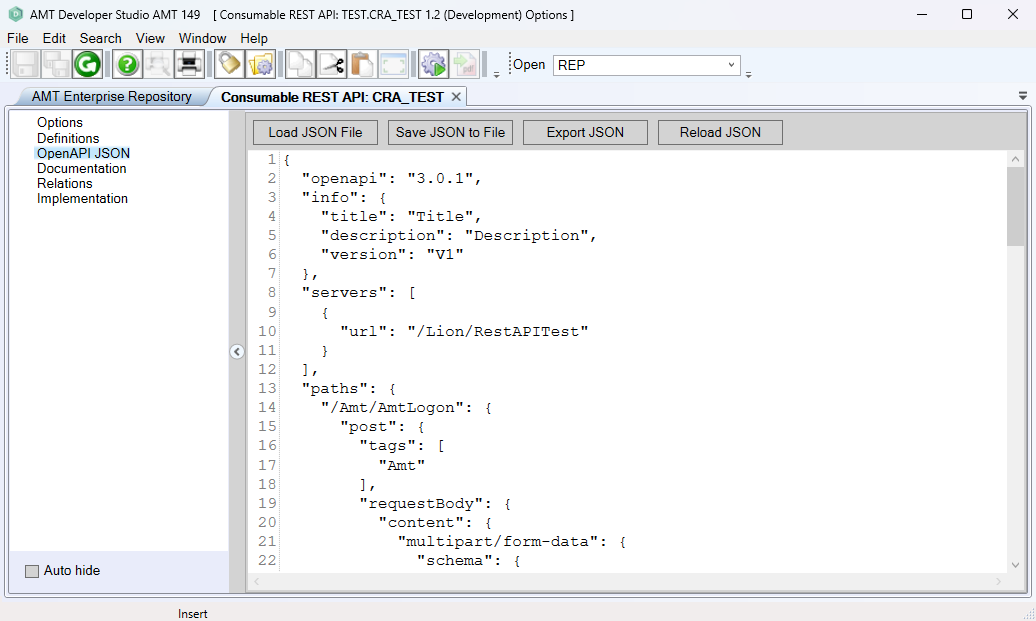
Consumable Web Service
In an AMT Consumable Rest API the OpenAPI JSON file can be loaded into AMT.
Load JSON File
By clicking the 'Load JSON File' button. A file explorer will open and a JSON file containing the OpenAPI specification can be selected.
Save JSON to File
With the 'Save JSON to File' button, the displayed OpenAPI specification can be saved as a JSON file.
Export JSON
This button exports the OpenAPI definition as either an OpenAPI (Swagger) version 2.0 or OpenAPI version 3.0 (latest patch) JSON file. Set the 'Save as type' option in the save file prompt to either V2 or V3 respectively.
Reload JSON
When the Reload button is clicked the displayed OpenAPI specification will be used to retrieve the necessary settings for the Consumable REST API web service. The displayed OpenAPI specification is editable and in this way changes can be made to the Consumable REST API Web Service by hand. But only do so when you are absolutely sure you know what you are doing.
|
The naming of classes generated from the OpenAPI JSON was changed in AMT 150. |