
Options
Sequences in AMT Lion are database objects that generate sequential numeric values, commonly used for primary keys and unique identifiers. The sequence Options screen allows you to configure the behavior and constraints of these sequences.
The Options screen for a sequence is shown below
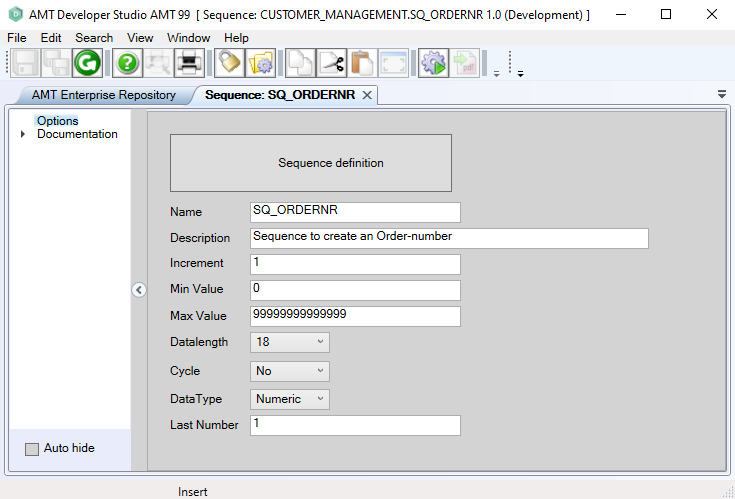
The following properties are set on the Options screen:
|
Property: |
Description: |
Value: |
|||
|---|---|---|---|---|---|
|
Name |
Name of the sequence. |
<Text> |
|||
|
Description |
Description of the sequence. |
<Text> |
|||
|
Increment |
The value by which the sequence is incremented for each NEXT VALUE call. Use negative values for descending sequences. |
<Integer> |
|||
| Min Value |
The minimum value of the sequence object. |
<Integer> | |||
| Max Value |
The maximum value of the sequence object. |
<Integer> | |||
| Datalength |
Specifies the precision for numeric sequences. Value 9 allows up to 999,999,999; value 18 allows up to 999,999,999,999,999,999. |
<9 | 18> | |||
| Cycle |
Determines behavior when Min/Max values are reached: |
<No | Yes> | |||
| DataType |
The datatype of the sequence, either Numeric or Int. |
<Numeric | Int> | |||
| Last Number |
The current value of the sequence. This represents the last number that was generated, not the starting value. The next NEXT VALUE call will return this value plus the Increment. |
Integer | |||
Remarks
To use sequences in AMT, employ the relevant SQL commands in a Free Join Query.
Refer to the documentation
for your database management system to learn which syntax to use. MSSQL example:
FQ_INS_ORDER.PrepareExec ('INSERT INTO T_ORDERS (ORDERNR, CUSTID, ITEM) VALUES( NEXT VALUE FOR SQ_ORDERNR, @Param1, @Param2)')
FQ_INS_ORDER.SetParamNumeric ('@Param1', CUSTID)
FQ_INS_ORDER.SetParamAlpha ('@Param2', ITEM)
FQ_INS_ORDER.ExecPrepared ()
If getlastresult <> ''
  SME(getlastresult)
endif