AMT Help Files

Logging
The menu option Logging controls the logging settings of the AMT environment. There are four tabs for different types of settings.
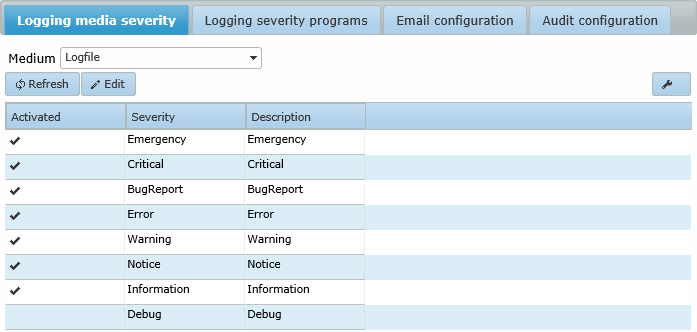
- Logging Media Severity controls the severity type logging to different media, like the System Database or Logfiles etc.
- Logging Severity Program controls the severity logging setting for each separate part of the AMT environment, like Batch Controller etc.
- Email configuration controls the e-mail severity type settings for the AMT environment.
- Audit configuration controls the logging of changes in the Security Configuration settings. Note: the settings in this tab are separate from the settings in the other three tabs and have no influence on the behaviour of the logging settings controlled by those tabs.
The way to configure the logging settings correctly is a follows:
- In the Logging Severity Program set the minimum Severity Level for each part of Runtime Environment before logging information will be generated.
- Then in the Logging Media Severity set for each Severity Level where the generated logging information will be stored. Multiple media for any Severity Level are allowed. E.g. Debug information could be sent both to the OutputDebugString for direct evaluation and to a Tracefile for later evaluation.
- In the Email configuration an email address should be set to send logging information stored in the email medium, to. E.g. when information generated in the two topmost Severity Levels is generated. This information could then be sent to a top level system adiminstrator.
- The settings of the Audit configuration can be set separately and have no influence on the behaviour of the logging settings controlled by the other three tabs.
| When an error occurs at the moment the logging is not yet correctly configured during the startup of a report, the error message will go into the Windows eventviewer. |