
Database
Click the Database node to open the database options of an application.
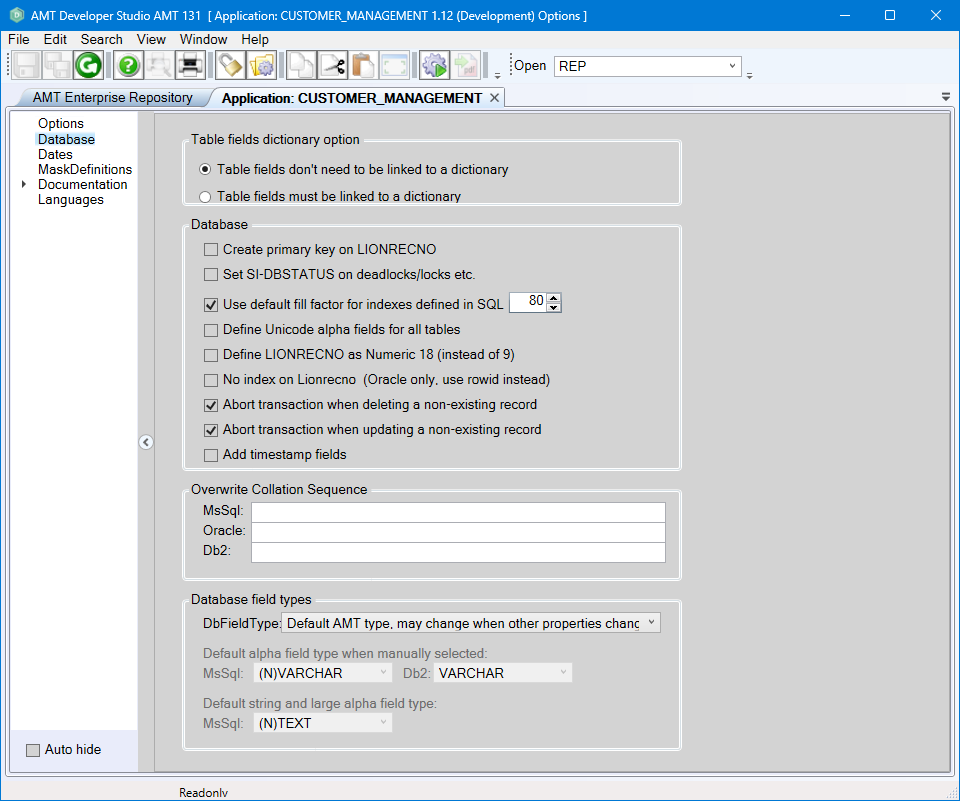
Table fields dictionary option
| Option | Description |
|---|---|
| Table fields don't need to be linked to a dictionary | If selected, table fields do not have to be linked to a dictionary item. Field names can be chosen freely. |
| Table fields must be linked to a dictionary | If selected, table fields must be linked to a dictionary item. |
Database
| Option | Description |
|---|---|
| Create primary key on LIONRECNO | If enabled, the system sets the primary key on LIONRECNO by default. If indexes use the option Set as primary key, this setting overrides the default application setting. |
| Set SI-DBSTATUS on deadlocks/locks etc. | If disabled, the system aborts the execution of Forms and Reports when certain database errors occur,
such as deadlocks. If enabled, the form or report continues execution, and the system sets
SI-DBSTATUS to the specific
error. Developers must check SI-DBSTATUS after
every database access in that case. You can override this default setting in the Form/Report options. |
| Use default fill factor for indexes defined in SQL |
If enabled, indexes inherit the default fill factor from the SQL database. info Note: this option is ignored when using SQL Azure databases, because SQL Azure does not support the default fill factor. If disabled, the system sets the default fill factor for indexes in the application according to the value you specify in the edit box on the right. You can overwrite the default value through each separate index. When setting the fill factor through the edit box, choose the value based on the number of
records to be added or changed in the relevant table. As an indication for setting a suitable fill factor,
consider the following: |
| Define Unicode alpha fields for all tables |
If enabled, alpha fields in all tables can contain Unicode. warning If you export Unicode data to ASCII files, non-ASCII characters are replaced by question marks. |
| Define LIONRECNO as Numeric 18 (instead of 9) |
If enabled, LIONRECNO becomes a Numeric 18 field instead of the default Numeric 9. warning If you use Numeric 9 on large systems, the value may exceed the maximum value of 999.999.999 over time. Therefore, when you perform a Reorganization on the database and LIONRECNO in one of the tables exceeds the value 950.000.000, the system issues a warning stating 'Nearing max value (999999999) of LionRecno. Current <current value>. Please renumber the table'. If you define it as Numeric 18, this warning does not appear. |
| No index on Lionrecno (Oracle only, use rowid instead) | If enabled, no implicit index is created on LIONRECNO for an Oracle database. This checkbox has no effect for an MS-SQL database. |
| Abort transaction when deleting a non-existing record | If enabled, the transaction will be aborted if deleting a non-existing record. |
| Abort transaction when updating a non-existing record | If enabled, the transaction will be aborted if updating a non-existing record. |
| Add timestamp fields | If enabled, timestamp fields are added to all tables in the application by default. This can be changed for each table individually in the Table Options. |
Overwrite Collation Sequence
| Option | Description |
|---|---|
| MsSql |
warning Changing the Overwrite Collation Sequence setting can greatly impact an AMT environment. Therefore, it is strongly advised to consult with Avanade before changing this setting. With the overwrite collation sequence, it is possible to set the application database to a case-insensitive collation while using a case-sensitive collation for the data itself. This allows queries with mixed case to be executed correctly, for example: "selECT * FRom TaBlE1". Per database kind a (case sensitive) collation sequence can be set, which is then used for the data (alpha/string fields) of new table fields. The developer is responsible for specifying the correct collation value. The reorganization program will use this collation when new tables/fields are added. It is strongly advised to only use the overwrite collation sequence for new applications/databases. Changing the collation for existing tables/fields is NOT supported. The reorganization program shows warnings if it finds tables/fields with a different collation sequence but will not execute the change. Migrating existing data must be done manually by creating a new database with the correct (case insensitive) collation sequence, running the reorganization program to create tables/fields with the overwrite collation sequence, copying the data to this new database and finally removing the old database. Also note that the collation sequence has no references to logic compares or sort compares. This means that changing the collation sequence on the database might result in unexpected compare results, as it expects the default collation sequence. warning Only the application database can have a different collation setting. Other AMT databases (for example, the system database) must be set according to the important settings for the used database system. Important Settings for MS-SQL Server or Important Settings for Oracle Database. |
| Oracle |
Extra requirements for Oracle databases:
|
| Db2 | At this moment, overwrite collation sequence is not supported for DB2 databases. |
Database field types
| Option | Description |
|---|---|
| DbFieldType | This setting controls the behavior of the DbFieldType value in an AMT table field. See 'Database field types' for more information.
|
| Default alpha field type when manually selected: | |
| MsSql | (N)VARCHAR or (N)CHAR For tables defined as Unicode, the database type NVARCHAR or NCHAR is used. Non-Unicode tables use VARCHAR or CHAR for alpha fields in an MSSQL database. |
| Db2 | VARCHAR or CHAR Choose either VARCHAR or CHAR as the default type for alpha fields in the database for DB2 databases. |
| Default string and large alpha field type: | |
| MsSql | (N)VARCHAR(MAX) or (N)TEXT For tables defined as Unicode, the system uses the database type NVARCHAR(MAX) or NTEXT. Non-Unicode tables use VARCHAR(MAX) or TEXT for large alpha fields in a MSSQL database. |