
Databases
The Databases tab displays the databases defined in the environment.
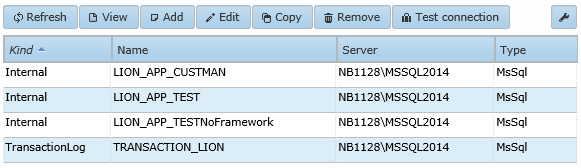
The Test connection button can be used at any time to test if the database server is reachable with the entered credentials, even if the data is not yet saved.
Under Kind of database, the following definition types are shown: internal for direct use in an application, external for use in other applications, system for access to the system database, transactionlog for a transaction logging database, and encryption for an encryption database. The name is the database name on the database server. The type can be MSSQL, Oracle, or DB2. Different options are displayed depending on the selected type.
When the Add button is clicked or a database is selected and Edit or Copy is chosen, the following window appears for MSSQL databases:
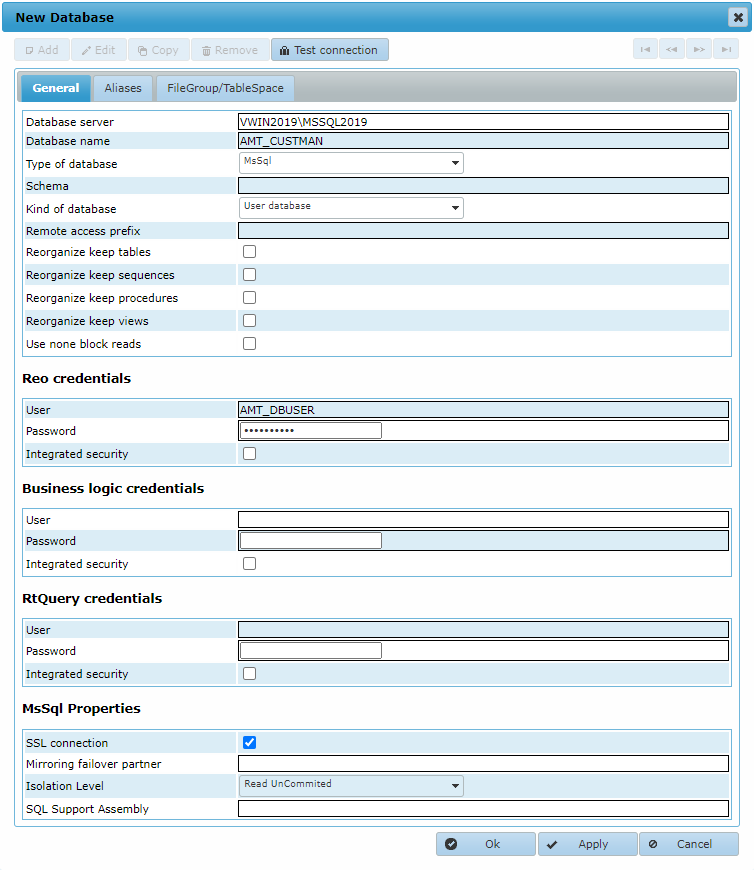
General tab
In the General tab, you can configure general settings.
If transactions must be logged, a transaction logging database is required.
If encryption is used, an encryption database is required.
- Database server:
- MSSQL: The ADO name of the MSSQL database server instance.
- Oracle: The logical database name of the Oracle database server.
- Database name:
- MSSQL: The name of the database.
- Oracle: The name of the Oracle Tablespace used for the database.
- Type of database: MSSQL, Oracle, or DB2.
- Schema: The user schema used for this database.
For an MSSQL server, schemas can only be used in combination with AmtReorganize.exe (Reo.exe does not support schemas in MSSQL). - Kind of database: Depends on the purpose for which the database is used.
- User database: Used for direct access within the application. This displays as Internal in the database list.
- Remote database: Used for remote access to databases from other applications. This displays as
External in the database list.
Encryption for remote databases is not supported. - System database: Used for access to the System database. This displays as System in the database list.
- Encryption database: Used for encryption settings. This displays as Encryption in the database list.
- Transaction logging database: Used for the logging of transactions. This displays as Transactionlog in the database list.
- Remote access prefix: Used when accessing remote databases. If the remote database is accessed through a "new connection" in alias settings, this field can be left blank. If the same database connection is used, this field must contain the full prefix so that tables can be accessed from the main user database connection. For MSSQL, set the prefix to "<databasename>.<owner>.". For Oracle, set it to "<schemaname>.".
- Reorganize keep tables: If enabled, all stored tables will be kept after the database is reorganized. If disabled, all tables and indexes not created through AMT will be removed when reorganizing the database.
- Reorganize keep sequences: If disabled, all sequences that have not been created via AMT will be removed when the database is reorganized.
- Reorganize keep procedures: If disabled, all stored procedures that have not been created via AMT will be removed when the database is reorganized.
- Reorganize keep views: If disabled, all stored database views that have not been created via AMT will be removed when the database is reorganized.
- Use non-block reads: If enabled, single records are read from the database. If disabled, reads are performed in larger blocks of records. For performance, it is recommended to leave this disabled.
Database credentials
Database credentials are split into three sections, which makes it possible to use different credentials for each section.
- Reo credentials: Used by the AMT reorganization program or service. This section is mandatory.
- Business logic credentials: Used by the AMT application server and AMT batch controller.
- RtQuery: Used for RtQuery, the database query tool in AMT Screens. Only used with User/Internal databases.
With the exception of the Reo credentials, it is not mandatory to enter credentials in every section. If a section is left blank, the Reo credentials are used for that section. All credential sections consist of the following options:
- User: Username to access the database.
- Password: Password to access the database. The combination of password and user should be a valid one for the database server (not for the AMT system).
- Integrated security: If enabled, the database will be accessed by Windows Integrated Security (i.e. the Windows username and password will be used and the username and password fields can be left empty). If disabled, SQL Server authentication (user/password) is used to connect to the database server.
Properties for MSSQL only
- SSL connection: If enabled, SSL/TLS will be used when connecting to the database server.
- Mirroring failover partner: If failover mirroring is used on SQL Server, the network name of the failover partner must be set here.
- Isolation level: The isolation level to set for SQL Server. Possible values are Read-Committed and Read-Uncommitted (dirty read).
- SQL Support Assembly: The location of an optional .NET assembly to be used in the SQL Server as a CLR stored procedure.
Properties for Oracle only
- Use cost based optimizer: If enabled, the Oracle cost based optimizer will be used.
Aliases tab
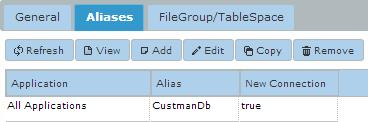
In the Aliases tab, you can set an alias for this database together with an application name. If an alias is set, this database can be accessed in that application under the alias as an external database. Use 'All Applications' if the database should be accessible under that alias in all applications.
FileGroup/TableSpace tab
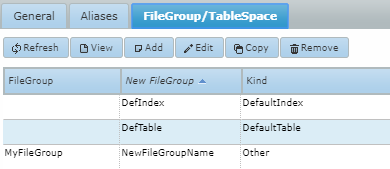
In the FileGroup/TableSpace tab, translations for FileGroups/TableSpaces can be set. Logical FileGroup/TableSpace names set in database objects (tables or indexes) within AMT Developer Studio can be translated to new FileGroup/TableSpace names corresponding to physical FileGroups/TableSpaces present in the database. When no translation entry is present for a FileGroup/TableSpace name, the original (logical) name is kept and used for the physical FileGroup/TableSpace. When adding, copying, or editing an entry, the following entry kinds are available:
- [Default Indexes] : When a database index in the AMT Developer Studio has no FileGroup/TableSpace set, the index will be placed in the physical FileGroup/TableSpace as set in the 'New FileGroup' field. This option can be set only once per database.
- [Default Tables] : When a database table in the AMT Developer Studio has no FileGroup/TableSpace set, the table will be placed in the physical FileGroup/TableSpace as set in the 'New FileGroup' field. This option can be set only once per database.
- Other : With this option, a logical FileGroup/TableSpace name set in a database object (index or table) within the AMT Developer Studio can be translated to a new FileGroup/TableSpace name. This enables the usage of different FileGroups/TableSpaces in duplicated applications using the same sources. (Logical) FileGroup names can only exist in one entry per database. (Physical) New FileGroup names, however, can be used multiple times per database in different entries.
Database objects will be placed in their physical FileGroups/TableSpaces upon reorganization of the database.