AMT Help Files

Relations
You can view object relations in two ways.
To see how an object links to other objects:
- Open the object you want to view relations for.
- To see relations in a table, select the Relations node. The Relations screen opens.
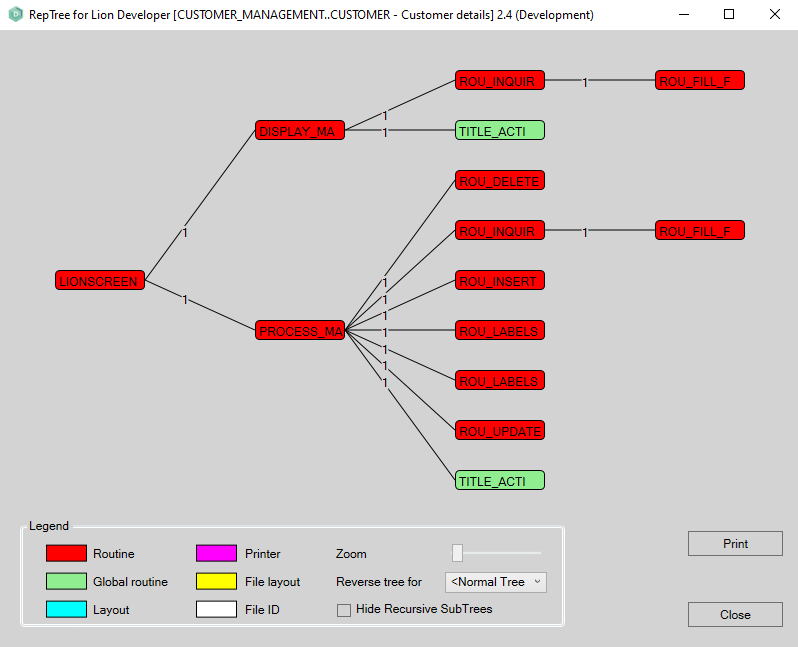
- To see a graphical view of the links, select the Implementation node, and then select Display calling tree. The calling tree window opens.
Important: Relations update when you generate objects. New relations appear only after you generate the related objects.
Relations screen
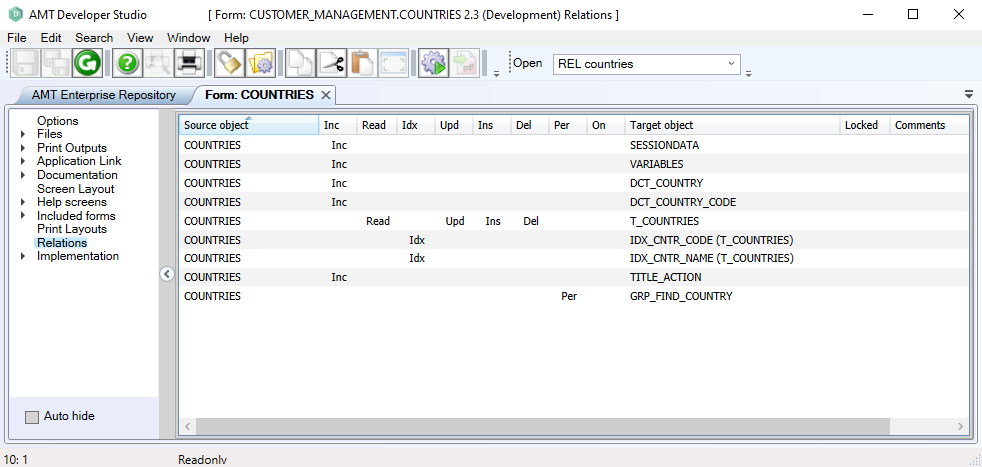
The Relations screen shows the actions that the source object (left column) performs on the target object. You can see whether these types of actions are performed:
| Type | Description |
|---|---|
| Inc | The target object is inserted in the source object. |
| Read | The target object is read by the source object. |
| Idx | The target object is an index. |
| Upd | The target object is updated by the source object. |
| Ins | One or more items are inserted to the target object by the source object. |
| Del | One or more items from the target object are deleted by the source object. |
| Per | The target object is called by the source object. |
| On | The target object is a table, and the source object is the index on that table. (Applies only for indexes). |
For example, for the form COUNTRIES within the application CUSTOMER_MANAGEMENT, the relations are displayed as follows:
The calling tree / RepTree window
In the example below, we called the tree for the form "CUSTOMER".
The colours indicate the object type as explained in the legend.