
Operations
Operations in Provided Web Services
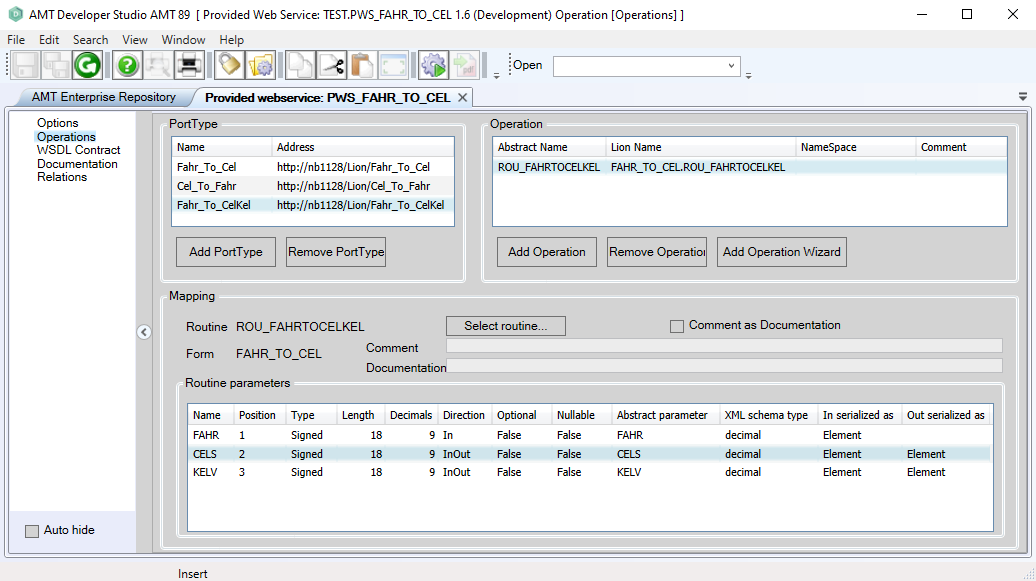
In the Operations screen all the information is available for the correct working of the Web Service. In a Provided Web Service the information can be changed in the panes listed below.
PortType
In the PortType pane a list the PortTypes defined for this Web Service are shown. In a Provided Web Service new PortTypes can be added, PortTypes can be modified and PortTypes can be deleted, see Managing PortTypes.
Operation
When a PortType has been selected in the PortType pane, the available Operations for this PortType will be listed in the Operation pane. In a Provided Web Service new Operations can added, Operations can be modified and Operations can be deleted, see Managing Operations.
Mapping
When an Operation has been selected in the Operation pane, the available Parameter Mappings for this Operation will be listed in the Mapping pane. The available parameter mappings are derived from the routine selected for the Operation the listed Parameter Mappings are for. In a Provided Web Service some settings of a selected Parameter Mapping can be modified using the Object Inspector, no Parameter Mappings can be added or deleted. See Managing Provided Mappings.