
Important Settings for IIS
SSL/TLS HTTPS
It is recommended to use HTTPS for all web services in your AMT environment for security reasons. More information on how to set up HTTPS in IIS, can be found on this external Microsoft support page: How to Set Up SSL on IIS.
Installed Components
The features and services listed below are required to run AMT web applications in the IIS.
Web Server Features
warning Ensure that the features listed below are selected when installing IIS. HTTP Activation is not selected by default and must be selected.
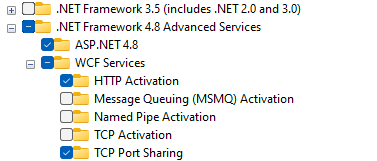
- .NET Framework 4.8 Advanced Services
- ASP.NET 4.8
- WCF Services
- HTTP Activation
- TCP Port Sharing
Web Server Role Services
warning Ensure the features listed below are selected while selecting the IIS Web Server Role Services.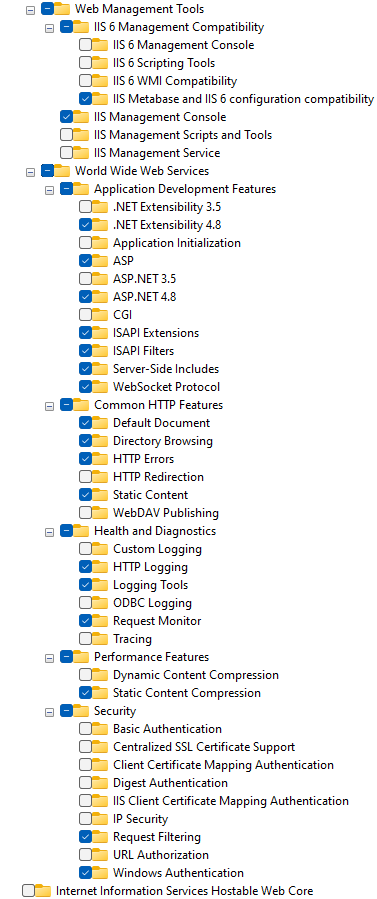
- Web Management Tools
- IIS 6 Management Compatibility
- IIS Metabase and IIS 6 configuration compatibility
- IIS Management Console
- IIS 6 Management Compatibility
- World Wide Web Services
- Application Development Features
- .NET Extensibility 4.8
- ASP
- ASP.NET 4.8
- ISAPI Extensions
- ISAPI Filters
- Server-Side Includes
- WebSocket Protocol
- Common HTTP Features
- Default Document
- Directory Browsing
- HTTP Errors
- Static Content
- Health and Diagnostics
- HTTP Logging
- Logging Tools
- Request Monitor
- Performance Features
- Static Content Compression
- Security
- Request Filtering
- Windows Authentication
- Application Development Features
Application Pool
When adding applications to the Default Website of the IIS an Application Pool has to be selected. The available Application Pools can be viewed in the IIS Manager by selecting the Application Pools node of the IIS Server. A list of available Application Pools should appear. An example of such a list is shown below.

For the AMT-COBOL applications to add to the Default Website, Application Pool to use should be an Application Pool with the Managed Pipeline Mode set to Integrated. When the IIS is configured using the AMT-COBOL Setup tool a special Application Pool will be created for the AMT-COBOL environment and each of the Control Center and Application Center web applications.
Of these Application Pools a few settings have to be checked and when needed changed for AMT-COBOL to work correctly. To do this select the Application Pool in the list and then click the Advanced Settings link in the right pane of the IIS Manager. The view shown below should appear.
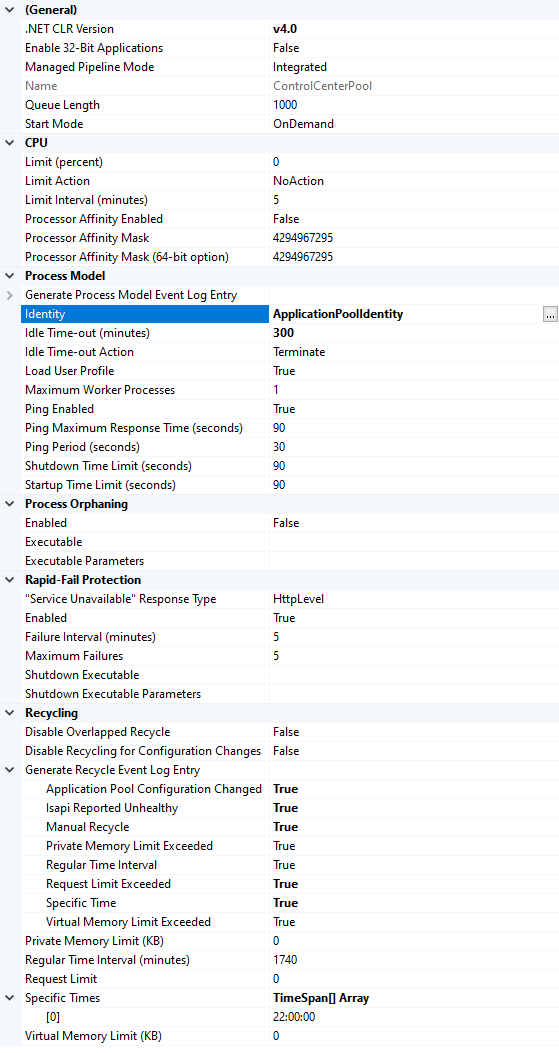
In this view the following settings need to be checked and when necessary changed.
- The Identity for Application Pool to use should ideally be set to a custom account which has access to both the
AmtTools folder and the database. This value ensures correct working of AMT-COBOL.
Note: By default ApplicationPoolIdentity will be set. This will work in most cases - The entry for Idle-Timeout should be set to 300 minutes.
- All the settings for Generate Recycle Event Log Entry should be set to True for debugging.
- Under Specific Times an element set to the time 22:00:00 should be added.
ISAPI and CGI Restrictions
In the left pane of the IIS Manager select the Webserver and then in the middle pane double click the ISAPI and CGI restriction icon. A list of available restrictions should appear as shown below.

The two entries for ASP.NET v4.0 should be set to Allowed. When the entries for ASP.NET v4.0 are missing open the
CMD prompt window by starting cmd.exe.
In a 32 bits Windows OS navigate to the directory:
C:\Windows\Microsoft.NET\Framework\v4.0.30319In a 64 bit Windows OS navigate to the directory:
C:\Windows\Microsoft.NET\Framework64\v4.0.30319and in either directory issue the command:
aspnet_regiis -iThen refresh the screen in the IIS Manager and the two entries will have been added to the list. They will however been added with the restriction set to Not Allowed and will have to be set to Allowed for correct functioning of AMT-COBOL.
Authentication Rules
It is important to set the correct authentication rules for the AMT web applications after these are added to the IIS. See the pages Adding the Necessary Websites to the IIS and Adding Blazor Web Applications for more information.