
STRUCTURE...ENDSTRUCTURE
| Syntax Color Legend |
|---|
| Command |
| Mandatory parameter |
| Optional parameter |
| Mandatory keyword |
| Optional keyword |
Syntax
<Structure name> : STRUCTURE [REDEFINES <Source variable>]
<Definitions>
END_STRUCTURE
Description
Within the (global) definition section, structures can be used to group all data items that are defined within the structure or to define the total number of elements of the arrays that are part of the structure.
Diagram
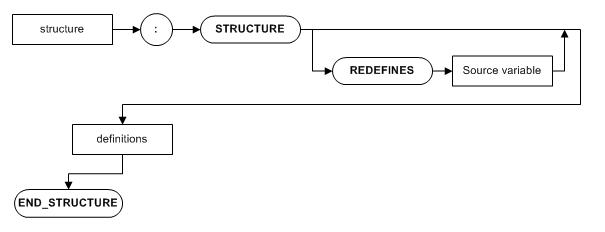
Parameters
| Parameter | Description |
|---|---|
| <Structure name> | The name of the structure. |
| REDEFINES | Makes the space of the <Source variable> available under the target structure name. When alpha, numeric, financial, or signed is used the type and length should also be defined. |
| <Source variable> | The name of the variable to be called under the <Structure name>. |
| <Definitions> | Definitions for constants, variables and arrays that are used in the program. (1) <Item name> : <Type> <Length>[.Decimals] [<Array dimensions>] [DCT <Dictionary item>] [Value <Value>] [FORMAT '<Format description>' [LEADING-SIGN | BLANK-WHEN-ZERO]] (2) <Item name> : [DCT <Dictionary item>] [<Array dimensions>] [Value <Value>] If the type and/or length of a value and also the dictionary are specified, they must match. For a description of the syntax elements, see also BEGIN_DEFINITIONS...END_DEFINITIONS . (3) filler : <Type> <Length>[.Decimals] [Value <Value>] Fillers can be used as a kind of delimiter wit a fixed value inside a structure. Multiple fillers with different values can be defined inside a structure. |
Remarks
A structure can be treated the same way as other data items. However, a field that is defined within a structure can also be called separately, the same way as is common if it was not defined within a structure.
The minus signs in negative signed values (including also financial values) in a structure are stored, in contradiction with non-structured signed variables.
Examples
Basic structure containing an array:
var
  sg-1 : structure
    sa-2   : alpha 2
    sn-10  : numeric 10
    sarray : alpha 10 [100]
  end_structure
It is possible to create an array of structures and a structure within a structure:
sg-2 : structure [10]
  sa-2 : alpha 2
  sg-3 : structure [4]
    sn-1 : numeric 1
    sa-1 : alpha 1 [3]
  end_structure
end_structure
For sub arrays also the element of the parent structure has to be specified
sg-3[2, 3] := '1XYZ'
sa-1[2, 3, 2] := 'Y'
The whole group of variables can be altered at once. Instead of filling/ changing or clearing variables separately, you can assign the value for the whole group at once. E.g. all the variables that are defined within the structure 'SG-1' can be cleared at once with the following code:
sg-1 := ''For an array of structures, array notation is required.
sg-2[] := ''if sg-1 <> ''
...
// <code>
...
endif// structure definitions
var
sg-4 : structure
sa-2 : alpha 2
end_structure
sg-5 : structure
sa-2 : alpha 2
end_structure
// in the code
sg-4.sa-2 := sg-5.sa-2